
How to Download AIS from the Income Tax Portal : The Ultimate Step by Step Guide for AY 2026-27

Dr. Haresh Adwani May 2026 14 min read
Imagine filing your income tax return confidently only to receive a notice three months later saying your reported income does not match what the Income Tax Department already knows. This is exactly what happens when taxpayers skip reviewing their Annual Information Statement (AIS) before filing ITR.
The AIS is not just another document on the Income Tax e-filing portal. It is the government’s comprehensive financial dossier on you capturing every significant transaction linked to your PAN,
In this complete guide, the tax professionals at Adwani and Company led by Dr. Haresh Adwani, PhD in Commerce and a qualified law graduate walk you through exactly how to download AIS from the Income Tax portal, how to open the password protected AIS PDF, how to interpret it, and why reconciling AIS before filing your ITR for AY 2026-27 could save you from costly income tax notices.
What Is the Annual Information Statement (AIS) and Why Does It Matter for ITR Filing?
The Annual Information Statement, commonly referred to as AIS, was introduced by the Income Tax Department of India to give taxpayers a consolidated, transparent view of all financial information that the department has collected about them from various reporting entities banks, brokers, mutual fund houses, registrars, employers, GST authorities, and more.
Before the introduction of AIS, taxpayers relied primarily on Form 26AS for TDS-related data. AIS goes several steps further it is a far more expansive document that captures the full spectrum of your financial activity throughout the financial year.
What Information Does AIS Contain?
AIS captures the following key categories of information:
- Salary income as reported by your employer
- Interest income from savings accounts, fixed deposits, recurring deposits, and bonds
- Dividend income from shares and mutual funds
- Capital gains from sale of equity shares, mutual fund units, debt instruments, and real estate
- Purchase and sale transactions of immovable property
- Mutual fund purchase and redemption details
- Foreign remittances sent or received under LRS (Liberalised Remittance Scheme)
- GST turnover figures for registered businesses
- High-value cash deposits or withdrawals
- TDS and TCS data (which also appears in Form 26AS)
- Rent paid or received above prescribed thresholds
- Cryptocurrency and virtual digital asset (VDA) transactions
Expert Insight: “The AIS has transformed how the Income Tax Department tracks compliance. Every mismatch between your filed return and your AIS is a potential trigger for a Section 143(1)(a) intimation or a full scrutiny notice. Reviewing AIS before filing ITR is no longer optional — it is essential,” says Dr. Haresh Adwani, Founder of Adwani and Company.
AIS vs Form 26AS vs TIS Key Differences Every Taxpayer Must Know Before Downloading
Many taxpayers confuse AIS with Form 26AS or are unsure about the Tax Information Summary (TIS). Here is a clear breakdown:
| Feature | Form 26AS | AIS (Annual Information Statement) | TIS (Tax Information Summary) |
| Scope | TDS, TCS, and advance tax only | Full financial transactions across all sources | Derived summary from AIS with taxpayer feedback |
| Introduced | 2002 | 2021 | 2021 |
| Capital Gains | ❌ Not included | ✅ Included | ✅ Included |
| Crypto / VDA | ❌ Not included | ✅ Included | ✅ Included |
| GST Turnover | ❌ Not included | ✅ Included | ✅ Included |
| Who Should Use | Basic TDS verification | Complete pre-ITR reconciliation | Final verified income summary |
In short: for AY 2026-27, always start with AIS, cross-check it against Form 26AS, review the TIS for any feedback you may have submitted, and only then proceed to file your income tax return.
Read our detailed guide on AIS Reconciliation and Income Tax Notice Management for a complete walkthrough.
How to Download AIS from the Income Tax Portal – Complete Step-by-Step Process
Downloading your Annual Information Statement from the Income Tax e-filing portal takes under five minutes if you know the right steps. Follow this exact process:
| # | Action | What to Do / Where to Click |
| 1 | Visit the Portal | Open your browser and go to the official Income Tax e-filing portal: incometax.gov.in |
| 2 | Log In with PAN | Click ‘Login’ at the top right. Enter your PAN as your User ID, along with your password and the captcha code. |
| 3 | Navigate to Services | On the dashboard, click on the ‘Services’ tab in the top navigation menu. |
| 4 | Click on AIS | From the dropdown under Services, select ‘Annual Information Statement (AIS)’. You will be redirected to the AIS portal (compliance.insight.gov.in). |
| 5 | Select Financial Year | On the AIS portal, select the relevant Financial Year — FY 2025-26 for AY 2026-27 — from the dropdown menu. |
| 6 | Choose Your Format | You can download AIS in two formats: PDF (for easy reading) or JSON (for data processing). For individual review, select PDF. |
| 7 | Download and Open | Click Download. Once downloaded, open the PDF. It will prompt you for a password. |
| 8 | Enter the Password | The AIS PDF password is: [PAN in lowercase] + [Date of Birth in DDMMYYYY format]. Example: if PAN is ABCDE1234F and DOB is 15-August-1985, the password is abcde1234f15081985. |
How to Download TIS (Tax Information Summary) from the AIS Portal
- On the AIS portal, go to the ‘TIS’ tab (next to ‘AIS’).
- Select the Financial Year.
- Click Download → select PDF or JSON.
- The TIS PDF uses the same password format as AIS: PAN (lowercase) + DOB (DDMMYYYY).
The TIS is particularly useful when the department processes your ITR and computes pre-filled data it uses TIS figures as the reference point for any automated intimations.
Why Reviewing AIS Is Critical Before Filing Your ITR for AY 2026-27
1. Catch Income the Department Already Knows About
Every bank, mutual fund house, stock broker, property registrar, and company that deducts TDS from your payments is required to report this information to the Income Tax Department. If they have reported income linked to your PAN and you do not include it in your ITR the department’s automated system will flag the mismatch immediately.
2. Identify Errors in Reported Data
AIS data is not always correct. Banks sometimes report interest income for the wrong PAN. Brokers may report capital gains figures that differ from your actual gains due to corporate actions. If you find incorrect entries in your AIS, you can submit feedback directly on the AIS portal, marking the entry as ‘Incorrect’ or ‘Not relating to me’. This feedback is reflected in your TIS.
3. Avoid Defective Return Notices and Scrutiny
The Income Tax Department’s automated processing system compares your filed ITR with your AIS/TIS data. Any significant discrepancy whether it is unreported mutual fund redemptions, omitted interest income, or missing property sale consideration — may result in an intimation under Section 143(1)(a) or even a scrutiny notice under Section 143(2), explains Dr. Haresh Adwani of Adwani and Company.
4. Claim Accurate TDS Credit
AIS also reflects TDS entries from multiple sources — salary TDS (Form 16), bank TDS on FD interest, TDS on professional fees, rent TDS, and more. Cross-checking AIS with your Form 26AS ensures you claim all available TDS credit and do not leave money on the table.
Learn more about our Income Tax Filing and TDS Compliance Services for salaried professionals and business owners.
Real-Life Example: How an AIS Mismatch Triggered an Income Tax Notice
| Case Study: Ravi, IT Professional, Pune • Salary: ₹14 lakh per annum • SIP investments in 3 equity mutual funds since 2021 (redeemed in FY 2025-26) • Fixed deposit interest: ₹42,000 (bank deducted TDS at 10%) • Ravi filed ITR-1 reporting only salary income and FD interest omitting LTCG of ₹1.18 lakh from mutual fund redemptions What Happened: The mutual fund house had already reported Ravi’s redemption and LTCG to the Income Tax Department via AIS. The ITR-1 Ravi filed (which cannot accommodate capital gains) was also the wrong form. Result: Defective return notice under Section 139(9) + intimation under Section 143(1)(a) for unreported capital gains. He had to refile using ITR-2, pay additional tax, and clear the notice — all of which could have been avoided with a 10-minute AIS review. |
Most Common AIS Mismatches That Trigger Income Tax Notices in AY 2026-27
- Mutual fund redemptions reported in AIS but not declared in ITR especially SIP redemptions or systematic withdrawal plans
- FD and savings account interest income under-reported or omitted entirely
- Dividend income from shares or mutual funds not included (dividends are now taxable in the hands of the investor)
- Property sale consideration shown in AIS at the registered value, while taxpayer reports lower consideration in ITR
- Cryptocurrency or VDA transactions reported by exchanges but omitted from ITR
- GST turnover in AIS not matching income declared in ITR (common for freelancers and small business owners)
- Foreign remittances or LRS transactions in AIS not reflected in ITR
- Employer reporting perquisites or ESOPs in AIS that the taxpayer was unaware of
Learn more about our AIS Reconciliation and Pre-ITR Compliance Review Services at Adwani and Company.
Who Must Absolutely Review AIS Before Filing ITR for AY 2026-27?
While every taxpayer benefits from an AIS review, certain profiles face the highest risk from AIS mismatches:
- Salaried professionals who invest in mutual funds, stocks, or have fixed deposits
- Freelancers and consultants who receive professional fees and may have GST registration
- Business owners whose GST turnover is captured in AIS and must match income tax declarations
- Doctors, architects, lawyers, and other self-employed professionals with TDS on professional fees
- NRIs with Indian income sources rental income, interest, dividends, or capital gains
- Stock market investors and traders particularly those with F&O trading activity
- Real estate investors who sold property during FY 2025-26
- Crypto investors whose exchange transactions are now reported to the Income Tax Department
Critical ITR Filing Deadlines and AIS Review Timeline for AY 2026-27
Managing your AIS review within the right timeline is essential for penalty-free ITR filing:
| Deadline / Action | Details |
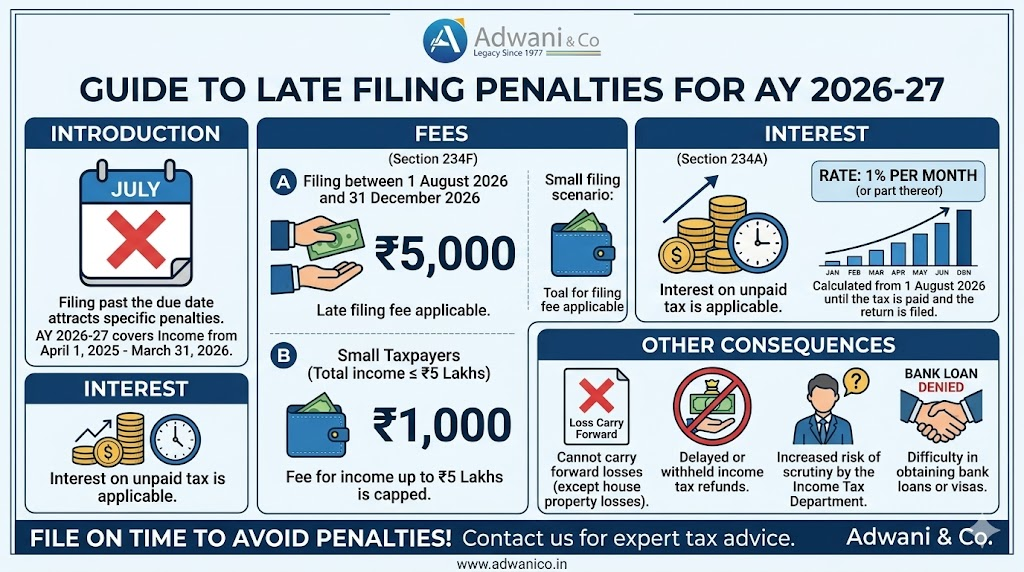
| ITR Filing Due Date (Non-Audit) | July 31, 2026 — File before this date to avoid late filing fee under Section 234F |
| Audit Cases ITR Due Date | October 31, 2026 |
| Belated Return Deadline | December 31, 2026 (with late fee of ₹1,000–₹5,000) |
| Ideal AIS Review Window | June 1 to July 15, 2026 — reconcile and file well before the deadline |
| AIS Feedback Submission | Submit corrections on the AIS portal before filing ITR to avoid mismatch notices |
Frequently Asked Questions
Q1. What is the AIS password to open the downloaded PDF?
The AIS PDF password is your PAN number in lowercase letters followed by your date of birth in DDMMYYYY format with no spaces or special characters. For example, if your PAN is ABCPQ9876R and your date of birth is 22nd January 1988, the password is abcpq9876r22011988.
Q2. Can an AIS mismatch trigger an income tax notice?
Yes absolutely. The Income Tax Department’s automated systems compare your filed ITR data against your AIS and TIS figures. Even minor discrepancies in interest income, capital gains, dividend income, or GST turnover can result in an automated intimation under Section 143(1)(a) or a scrutiny notice under Section 143(2). This is why AIS reconciliation before ITR filing is non-negotiable.
Q4. What should I do if I find incorrect information in my AIS?
You can submit feedback directly on the AIS portal against any entry. Options include marking it as ‘Information is correct’, ‘Information is not fully correct’, ‘Information relates to other person / year’, ‘Information is duplicate / included in other information’, or ‘Information is denied’. This feedback updates your TIS, which is then used as a reference for ITR pre-fill and automated processing.
Q6. Is there a late filing penalty even if my tax payable is nil after TDS?
Yes. Under Section 234F of the Income Tax Act, a late filing fee of ₹1,000 applies if your total income exceeds ₹2.5 lakh but does not exceed ₹5 lakh, and ₹5,000 if your income exceeds ₹5 lakh regardless of whether your tax liability after TDS credit is nil. Filing before July 31, 2026 avoids this penalty entirely.
Q7. Can I download AIS for previous financial years?
Yes. The AIS portal at compliance.insight.gov.in allows taxpayers to access AIS data for multiple financial years. You can select FY 2024-25, FY 2023-24, or earlier years from the financial year dropdown. This is particularly useful when responding to income tax notices for past years or filing belated/revised returns.
Conclusion:
The Annual Information Statement is the Income Tax Department’s most powerful transparency tool and it should be your most important pre-filing checklist. Before you file a single digit in your ITR for AY 2026-27, download your AIS, open it with the correct password, reconcile every entry against your own records, and submit feedback for any incorrect data.
As Dr. Haresh Adwani of Adwani and Company emphasises: “Taxpayers who review their AIS carefully before filing rarely face income tax notices. Those who skip it often spend weeks dealing with the consequences. The ten minutes spent on AIS review today saves ten hours of notice management tomorrow.”
About the Author
Dr. Haresh Adwani
Ph.D. in Commerce | Law Graduate | Managing Partner, Adwani & Co LLP Dr. Haresh Adwani holds a Ph.D. in Commerce and is a qualified Law graduate with over two decades of hands-on experience in GST advisory, direct taxation, and statutory compliance for businesses across Pune and Maharashtra. He has guided hundreds of SMEs, startups, and corporates through India’s evolving tax landscape. He is a recognised advisor on GST compliance, company formation, and Virtual CFO services, and regularly contributes to professional seminars and industry forums in Pune.