Tag: SALARY VS AIS MISMATCH

  • Form 16 for ITR Filing AY 2026-27: What It Covers : and What It Silently Misses

    Form 16 for ITR Filing AY 2026-27: What It Covers : and What It Silently Misses

    Form 16 for ITR Filing

    Every June, millions of salaried employees across India receive one document from their employer and immediately assume their tax homework is done. That document is Form 16. And that assumption? It is one of the most common and costliest tax filing mistakes of the year.

    Form 16 for ITR filling is important. But it is not the complete picture. For AY 2026-27, filing your Income Tax Return based only on Form 16 can leave out significant taxable income, trigger a mismatch with your Annual Information Statement (AIS), and even invite an income tax notice. This guide breaks down exactly what Form 16 covers, what it misses, and what you must do before hitting ‘Submit’ on the income tax portal.

    What Is Form 16 for ITR filling and Why Do Salaried Employees Receive It?

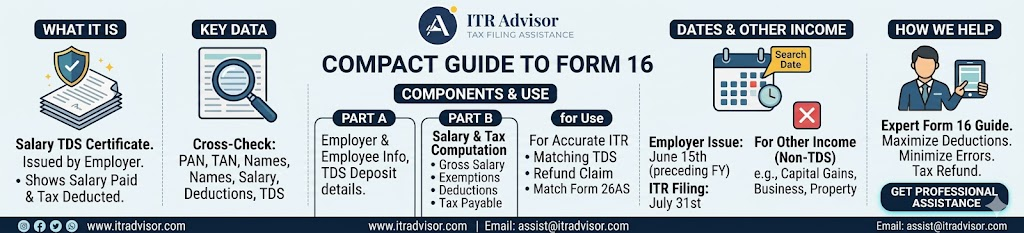
    Form 16 is a TDS certificate issued by your employer under Section 203 of the Income Tax Act, 1961. It certifies the amount of tax deducted at source (TDS) from your salary and deposited with the government on your behalf. As per the Income Tax Department, every employer who has deducted TDS from salary payments is required to issue Form 16 to employees by June 15 of the assessment year.

    The document has two parts:

    Part A : The TDS Summary

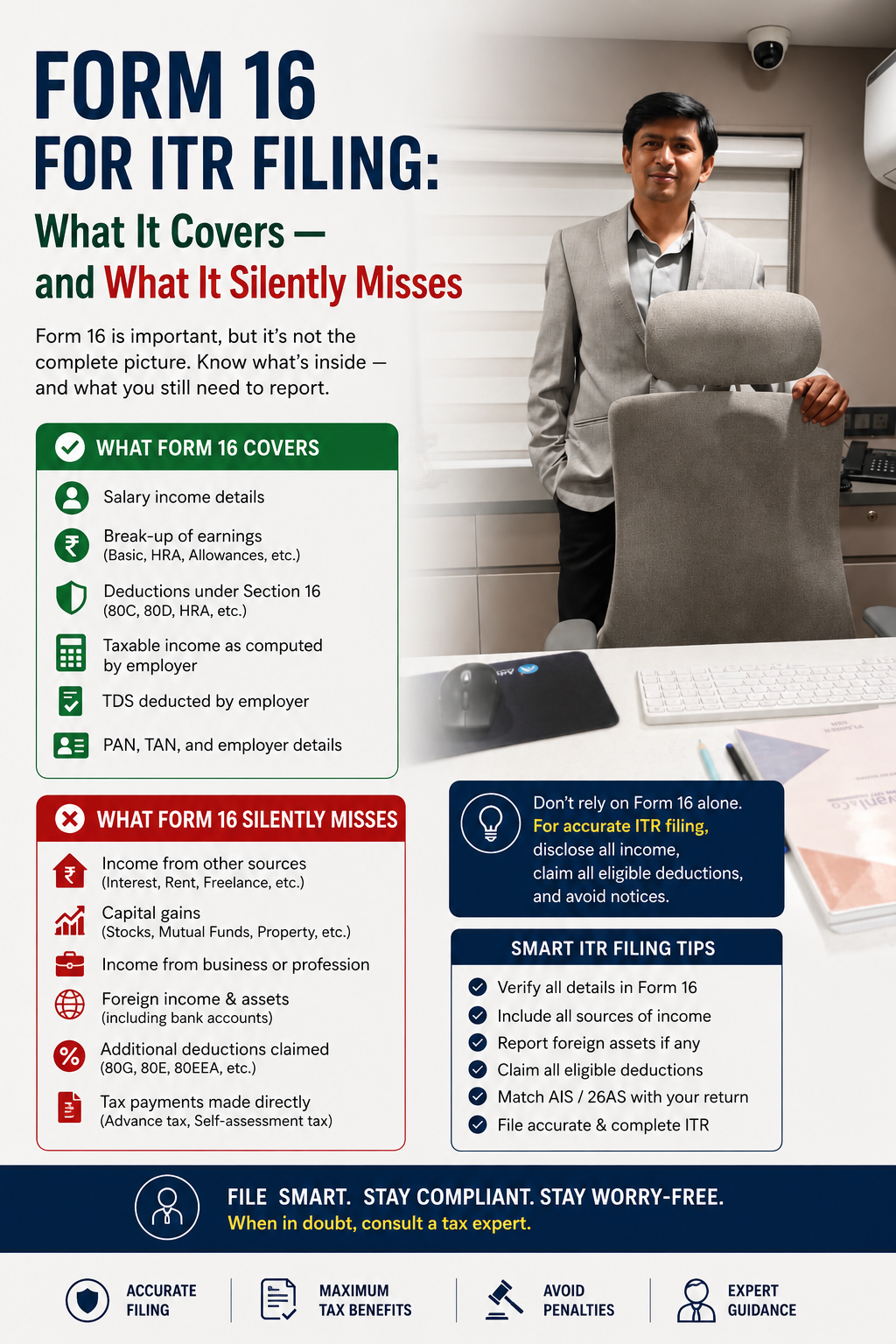
    Part A Covers:

    • Employer and employee PAN and TAN details
    • Quarter-wise TDS deducted and deposited

    Certificate number issued by TRACES (the government’s TDS reconciliation portal

    Part B : The Salary Breakdown

    Part B Covers:

    • Gross salary and allowances
    • Exempt allowances (HRA, LTA, etc.)
    • Deductions claimed under Chapter VIA (80C, 80D, 80G, etc.)
    • Net taxable salary and final tax computed

    Tax regime chosen (old or new)

    Also Read our Detailed guide on :Old vs New Tax Regime 2025: Stop Guessing, Start Calculating

    Together, Parts A and B give you a structured view of your salary income and the tax your employer calculated. But and this is critical Form 16 only reflects what your employer knows about your finances.

    What Form 16 for ITR filling Does NOT Cover: Income That Belongs in Your ITR

    This is where most salaried taxpayers go wrong when filing their ITR for AY 2026-27. Your employer can only deduct TDS on the salary they pay you. Any income earned outside of that employment relationship is completely invisible to them and therefore absent from Form 16.

    Here is income that will not appear in your Form 16 but must be disclosed in your ITR:

    • Interest income from savings accounts, fixed deposits, recurring deposits, and post office schemes often reported by banks to the Income Tax Department via Statement of Financial Transactions (SFT)
    • Capital gains from the sale of shares, equity mutual funds, debt funds, or property taxed at different rates under LTCG and STCG rules
    • Rental income from residential or commercial property let out during the year
    • Freelance, consulting, or professional income earned over and above your salary
    • Income from previous employers if you changed jobs during the financial year
    • Dividend income from shares and mutual funds now fully taxable in the hands of the investor
    • Winnings from online gaming, lottery, or other speculative sources

    Practical Example: Ramesh is a salaried IT professional in Pune earning ₹14 lakh annually. His employer deducts TDS and issues Form 16 reflecting zero additional tax liability. However, Ramesh also has ₹85,000 in FD interest and ₹1.2 lakh in STCG from selling equity mutual funds. None of this appears in his Form 16. If he files his ITR based only on Form 16 and ignores these, his AIS (Annual Information Statement) will show the mismatch and the Income Tax Department may send him a notice under Section 143(1)(a) for under-reporting of income.

    Form 16 vs AIS: Why a Mismatch Can Trigger an Income Tax Notice

    The Income Tax Department’s AIS and Form 26AS now capture a comprehensive view of your financial transactions far beyond what your employer reports. Banks report interest income. Brokers report capital gains. Mutual fund houses report redemptions. Registrars report property transactions.

    Before filing your ITR for AY 2026-27, always cross-verify your Form 16 with your AIS and Form 26AS available on the Income Tax e-filing portal. Any mismatch between what you declare and what the department already knows through third-party reporting can result in a defective return notice or tax demand.

    If you find a discrepancy, the correct approach is to file an accurate return reflecting your true total income not simply what Form 16 shows.

    How to File ITR Using Form 16 Correctly for AY 2026-27

    Here is a structured approach for salaried employees to use Form 16 as a starting point not an endpoint for ITR filing:

    Step 1: Download and Verify Form 16

    Ensure your Form 16 has a valid TRACES watermark and matches the TDS reflected in your Form 26AS. Part A details must be TRACES-generated; do not accept manually typed versions from employers.

    Step 2: Collect All Income Sources

    Gather interest certificates from all banks and NBFCs, capital gains statements from your broker or mutual fund house (from Consolidated Account Statement), and rent receipts if applicable.

    Step 3: Compute Total Income

    Add all sources to your salary income from Form 16. This gives you your actual gross total income, which may be significantly higher than what Form 16 reflects.

    Step 4: Choose the Right ITR Form

    If you only have salary and interest income, ITR-1 applies. If you have capital gains, you need ITR-2. Business or professional income alongside salary means ITR-3 or ITR-4. Read our detailed guide on ITR-1 vs ITR-2 vs ITR-4 for AY 2026-27.

    Step 5: File Before the Deadline

    The ITR filing deadline for AY 2026-27 for salaried individuals is July 31, 2026. Late filing attracts a penalty under Section 234F of up to ₹5,000, plus interest under Section 234A on any tax due.

    Key Takeaways

    • Form 16 is issued by your employer and covers only your salary income and TDS it is the starting point for your ITR, not the complete picture.
    • Income from FDs, capital gains, rent, freelancing, and dividends is NOT reflected in Form 16 but must be declared in your ITR.
    • A mismatch between Form 16 and your AIS/Form 26AS can trigger an income tax notice under Section 143(1)(a).
    • Always verify your Form 16 against your AIS before filing. The ITR deadline for AY 2026-27 is July 31, 2026.

    Choose the right ITR form based on your complete income not just your salary.

    As Dr. Haresh Adwani, PhD in Commerce and a practicing law graduate with decades of tax advisory experience, often emphasizes to his clients: “Form 16 tells you what your employer reported. Your ITR must tell the government the complete truth and those two numbers are rarely the same for most urban professionals.”

    Frequently Asked Questions

    1. Is Form 16 mandatory to file ITR for salaried employees?

    Form 16 is not legally mandatory to file ITR, but it is the most reliable document to report salary income accurately. You can file using salary slips and Form 26AS if your employer has not issued Form 16.

    2. Can I file ITR using only Form 16 without checking AIS?

    Filing without checking your AIS is risky. The Income Tax Department uses AIS data to auto-verify returns, and any mismatch can result in a defective return notice or demand for additional tax.

    3. What income is not included in Form 16 for ITR filing?

    FD interest, savings account interest, capital gains on shares and mutual funds, rental income, dividend income, and freelance earnings are not included in Form 16 and must be added separately while filing ITR.

    4. What happens if I file ITR based only on Form 16 and miss other income?

    The Income Tax Department may issue a notice under Section 143(1)(a) for under-reporting. You may also face additional tax demand with interest under Sections 234A, 234B, and 234C.

    5. Which ITR form should I use if I have capital gains along with salary income?

    If you have capital gains (LTCG or STCG) from shares or mutual funds along with salary, you must file ITR-2. ITR-1 does not allow disclosure of capital gains income.

    Conclusion:

    Form 16 is one of the most important tax documents an Indian salaried employee receives. But treating it as the only input for your Income Tax Return is a mistake that thousands of taxpayers repeat every year. From capital gains on mutual fund redemptions to bank FD interest quietly accumulating in your accounts your total taxable income is almost always larger than what your employer has captured.

    Filing an accurate, complete ITR protects you from notices, demands, and penalties and ensures you claim every refund you legitimately deserve. Take the time this season to check your AIS, gather all income sources, and file a return that truly reflects your financial year.

    About the Author:

    Mukesh Chavan is a dedicated indirect taxation and compliance professional associated with Adwani & Co LLP, specializing in GST advisory, GST audits, GST assessments, and RERA compliance services. With extensive experience in handling complex regulatory matters, he assists businesses in ensuring compliance with evolving GST laws and real estate regulations while minimizing risks and enhancing operational efficiency.

    Mukesh has successfully guided clients through GST registrations, return compliance, departmental assessments, audits, litigation support, and tax planning strategies. He also possesses significant expertise in RERA compliance, helping real estate developers, promoters, and stakeholders navigate regulatory requirements and maintain seamless project compliance.

    Through his articles and professional insights, Mukesh aims to simplify complex GST and RERA provisions, offering practical guidance that empowers businesses to remain compliant, avoid disputes, and make informed decisions in an increasingly dynamic regulatory environment. His approach combines technical expertise with practical business understanding, enabling clients to focus on growth while meeting their statutory obligations with confidence.

    Need Help with NRE/NRO Taxation?

    Whether you are an NRI, OCI holder, overseas employee, or a returning Indian, understanding the tax implications of NRE and NRO accounts is critical.

    At ITRAdvisor.in, we help NRIs and returning Indians with:

    ✔️ NRE and NRO taxation

    ✔️ Residential status determination

    ✔️ Returning NRI tax planning

    ✔️ DTAA advisory

    ✔️ Foreign asset reporting

    ✔️ NRI Income Tax Return filing

    ✔️ Tax notice handling

    ✔️ Capital gains and property taxation

    If you are unsure whether your NRE interest is taxable, whether you need to file an ITR in India, or how to handle NRO income, professional guidance can help avoid costly mistakes.

    Visit ITRAdvisor.in to schedule a consultation and get clarity on your NRI tax obligations.

    Disclaimer: ITRAdvisor.in is an educational and informational platform focused on tax awareness and compliance updates. Nothing contained herein should be construed as solicitation or advertisement of professional services. Professional services, where applicable, are rendered in accordance with ICAI guidelines. This article is published on ITRAdvisor.in, a tax and compliance knowledge platform. The content has been reviewed for technical accuracy by professionals associated with Adwani & Co LLP.

    A prominent “File Your ITR Now” button near the top and again at the end of the article.

    Need help filing your Income Tax Return? Click the WhatsApp icon and our team will guide you through the process and assist you with your ITR filing.

    Have questions about your ITR? Click the WhatsApp icon to connect with our tax experts for quick guidance and personalized assistance.

  • Salary vs AIS Mismatch in Your ITR : Dangerous, Common & Completely Fixable

    Salary vs AIS Mismatch in Your ITR : Dangerous, Common & Completely Fixable

    Here’s Why It Happens and Exactly How to Fix It Before the Tax Department Comes Knocking (2026)

    Salary vs AIS Mismatch in ITR 2026: Reasons, Risks & Step-by-Step Solutions

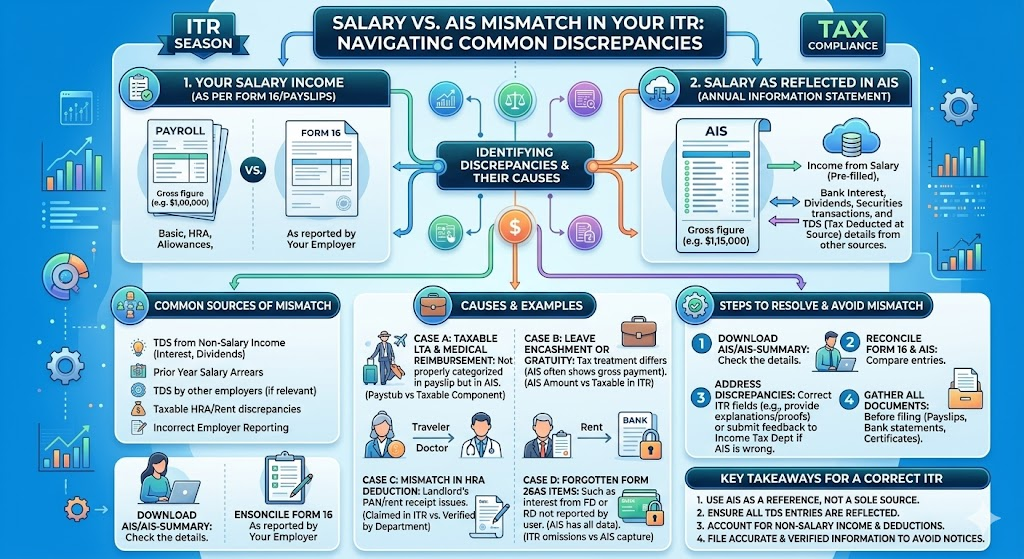
    You filed your Income Tax Return confidently and then the refund just didn’t come. Or worse, a notice arrived asking you to explain why the salary reported in your ITR does not match the figures in your Annual Information Statement (AIS). If you are a salaried taxpayer in India, a salary vs AIS mismatch is one of the most common and most avoidable reasons your ITR gets flagged, your refund gets delayed, or a formal income tax scrutiny notice lands in your inbox.

    The AIS, introduced by the Income Tax Department under Section 285BB, consolidates data from multiple sources: your employer’s TDS returns (Form 24Q), banks, mutual funds, and even foreign remittances. When the income you declare in your ITR doesn’t align with what the AIS shows, the system triggers an alert automatically. In AY 2026-27, with AI-driven matching now deeply integrated into the income tax portal at incometax.gov.in, even minor salary vs AIS mismatches are getting picked up faster than ever before.

    The good news: every mismatch has a reason, and every reason has a fix. This guide breaks it all down.

    What Is the AIS and Why Does Salary vs AIS Mismatch Occur?

    The Annual Information Statement (AIS) is a comprehensive financial snapshot that the Income Tax Department generates for every taxpayer. Unlike the older Form 26AS which primarily captured TDS and TCS data the AIS captures a far wider range of transactions, including salary, interest income, dividends, mutual fund transactions, foreign remittances, and more.

    A salary vs AIS mismatch in ITR typically occurs when there is a gap between:

    • The salary figure reported by your employer in their TDS returns (Form 24Q) which flows into your AIS
    • The salary income you declare in your ITR based on your Form 16 or salary slips
    • Or when multiple employers in the same year report salary figures that do not reconcile with each other or with what you have declared

    Understanding the exact cause of the mismatch is the first and most critical step. Read our detailed guide on Form 26AS vs AIS vs TIS: Key Differences & How to Match Them Before Filing ITR for a complete primer on how these three documents interact.


    The 7 Most Common Reasons for Salary vs AIS Mismatch : and How to Fix Each

    Common Mismatch ReasonLikely Root CauseQuick Fix
    Employer filed incorrect TDS return (Form 24Q)Wrong salary or TDS figure submitted by employer to TRACESRequest employer to file a TDS correction statement immediately
    Job change mid-year: two Form 16s not reconciledBoth employers report salary separately; taxpayer adds them incorrectlyAdd both salary components; verify AIS reflects both TDS credits
    Perquisites/allowances excluded from ITREmployer includes all taxable perks in Form 24Q; taxpayer omits themInclude all taxable components per Form 16 Part B in your ITR
    AIS shows salary but Form 16 figure is lowerEmployer may not have updated revised TDS return after increments/bonusesReconcile with salary slips; raise feedback on AIS portal if data is wrong
    TDS deducted but not deposited by employerEmployer deducted TDS but failed to deposit to government it appears in salary but not in TDS creditFile ITR; follow up with employer; raise grievance on TRACES if needed
    AIS shows excess salary due to data duplicationTRACES data entry error or duplicate reporting by employerSubmit feedback on incometax.gov.in AIS portal mark as ‘Duplicate / Incorrect’
    Previous year arrears included in AISEmployer included arrears received in FY 2025-26 but attributable to earlier yearsClaim relief under Section 89(1); file Form 10E before filing ITR

    How to Use the AIS Feedback Feature to Dispute a Salary Mismatch

    One of the most powerful and underused tools available to taxpayers is the AIS Feedback mechanism on the income tax portal. If the salary figure in your AIS is incorrect, you do not have to simply accept it and file a potentially wrong ITR.

    Here’s how to submit an AIS mismatch correction:

    1. Log in to incometax.gov.in : Navigate to the AIS/TIS section under ‘Services’. Download your AIS for FY 2025-26.
    2. Identify the specific entry with the mismatch: Under the ‘Salary’ section of AIS, locate the entry that does not match your Form 16 or salary records.
    3. Click ‘Feedback’ against the incorrect entry: Select the appropriate reason: ‘Income is not as per source’, ‘Income is for a different year’, ‘Duplicate information’, or ‘Denied — not my income’.
    4. Submit with supporting details: Briefly explain the discrepancy. The portal records your feedback and updates your Taxpayer Information Summary (TIS), which is the adjusted figure used as a reference for your ITR.
    5. File your ITR based on the correct TIS figure: Once you’ve submitted feedback, the TIS gets updated. File your ITR aligned with the correct, verified figures not the original incorrect AIS entry.

    Important: Submitting AIS feedback does not automatically change the underlying data the original AIS still shows the employer’s reported figure. What changes is the TIS, which is your curated, taxpayer-revised view of income. The Income Tax Department uses both when assessing your return.


    What Happens If You File ITR Without Fixing a Salary vs AIS Mismatch?

    This is where many salaried taxpayers make a costly mistake. Filing your ITR with figures that differ from the AIS without submitting feedback explaining the discrepancy places your return in a high-risk zone for the following consequences:

    • Defective return notice under Section 139(9) : requiring you to resubmit the ITR within 15 days
    • Income tax scrutiny notice under Section 143(2) where the Assessing Officer formally examines your return
    • ITR refund delay : your refund gets held pending AIS reconciliation by the CPC (Centralised Processing Centre)
    • Demand notice under Section 156 : if the department independently computes a higher income and raises a tax demand
    • Penalty under Section 270A : for under-reporting or misreporting income, ranging from 50% to 200% of the tax on the under-reported amount

    Read our detailed guide on ITR Refund Delay 2026: Why It’s Late, How to Check Status & Escalate It to understand why AIS mismatches are among the top causes of refund delays.

    Read our detailed guide on Income Tax Notice Time Limit 2026 to understand how long the department can pursue a mismatch case.

    Expert Insight

    Dr. Haresh Adwani, senior chartered accountant and co-founder of Adwani & Co LLP, advises every salaried client to treat AIS reconciliation as a mandatory pre-filing step — not an afterthought. In his experience, over 60% of ITR refund delays handled by the firm each year trace back to unresolved AIS discrepancies that could have been corrected in under 30 minutes before filing.“Your AIS is the Income Tax Department’s version of your financial year. Before you file your ITR, make sure your version and theirs are telling the same story.”


    Pre-Filing AIS Checklist: How Smart Taxpayers Avoid Salary Mismatch Issues

    Adopting a structured pre-filing review process is the single most effective way to prevent salary vs AIS mismatch in ITR. Here is the checklist used by tax professionals before filing returns for their clients:

    • Download Form 16 (Part A and Part B) from your employer this is your authoritative salary document
    • Download your AIS and TIS from incometax.gov.in under the ‘Services’ tab
    • Cross-check: Salary in Form 16 Part B ↔ Salary in AIS ↔ What you plan to declare in ITR
    • Cross-check: TDS deducted per Form 16 Part A ↔ TDS credit shown in Form 26AS ↔ TDS in AIS
    • For job-changers: ensure both Form 16s are in hand; check that both employers’ TDS is reflected in your AIS
    • For arrears recipients: verify if Section 89(1) relief applies and file Form 10E before filing ITR
    • Submit AIS feedback for any incorrect entries before filing do not file first and fix later
    • Use the ITR pre-fill feature on the portal carefully pre-filled data comes from AIS, which may itself have errors

    Read our detailed guide on How to File ITR Online 2026: Step-by-Step Guide for Salaried & Freelancers for a complete walkthrough with the AIS reconciliation step built in.

    Learn more about our ITR Filing & Notice Response Service for expert-assisted, AIS-verified ITR filing.


    Key TakeawayS

    What Every Salaried Taxpayer Must Know About Salary vs AIS Mismatch

    • The AIS on incometax.gov.in captures salary data directly from your employer’s TDS returns it may differ from your Form 16 if the employer filed incorrect TDS returns.
    • A salary vs AIS mismatch in ITR is one of the top causes of income tax notices, refund delays, and defective return flags in AY 2026-27.
    • The AIS Feedback feature allows you to dispute incorrect entries online always submit feedback before filing your ITR, not after.
    • Job changers and arrears recipients face the highest mismatch risk reconcile both Form 16s and consider Section 89(1) relief where applicable.
    • Filing your ITR with the correct, reconciled figures even if they differ from an incorrect AIS entry is legally sound, provided you have documented evidence and submitted AIS feedback.

    The Taxpayer Information Summary (TIS) is the adjusted AIS figure after your feedback always cross-check TIS before final ITR submission.


    Frequently Asked Questions

    Q1. What should I do if my salary in AIS is higher than my Form 16?

    First, verify whether the difference relates to unreported perquisites, allowances, or arrears that your employer included in their TDS return. If the AIS figure is genuinely incorrect, submit an ‘Income is not as per source’ feedback on the AIS portal before filing your ITR.

    Q2. Can I file my ITR with the Form 16 figure even if AIS shows a different salary amount?

    Yes you should always file based on the correct, documented figure from your Form 16 and salary records. However, you must also submit AIS feedback explaining the discrepancy; otherwise, the mismatch may trigger a notice or refund delay.

    Q3. Will a salary vs AIS mismatch automatically delay my income tax refund?

    Yes, it often does. The CPC (Centralised Processing Centre) puts AIS-unmatched returns on hold for reconciliation before processing refunds. Resolving the mismatch before filing is the only reliable way to prevent this.

    Q4. What if my employer has deducted TDS but it’s not showing in my AIS or Form 26AS?

    This typically means your employer deducted TDS but either filed an incorrect TDS return or failed to deposit the tax. Raise the issue with your employer’s payroll/finance team to file a TDS correction statement; you can also raise a grievance on the TRACES portal.

    Q5. How does the Income Tax Department detect salary vs AIS mismatch automatically?

    The Income Tax Department’s AI-powered Centralised Processing Centre cross-checks the income declared in your ITR against the AIS data sourced from your employer’s Form 24Q filings. Any variance beyond an internal threshold triggers an alert which may result in a defective return notice or scrutiny.

    Conclusion:

    A salary vs AIS mismatch in ITR is not an insurmountable problem it is a solvable one, provided you address it before hitting the ‘Submit’ button on your return. The Income Tax Department’s AIS portal gives you the tools to verify, dispute, and correct your data. What it cannot do for you is the 30-minute reconciliation exercise that separates a smooth ITR filing from a notice-driven nightmare.

    In AY 2026-27, with AI-backed matching and a strengthened faceless assessment framework, the margin for unaddressed mismatches has all but disappeared. Treat AIS reconciliation as Step Zero of your ITR filing process not an optional extra.

    About the Author
    Dr. Haresh Adwani
    Ph.D. in Commerce | Law Graduate | Managing Partner, Adwani & Co LLP Dr. Haresh Adwani holds a Ph.D. in Commerce and is a qualified Law graduate with over two decades of hands-on experience in GST advisory, direct taxation, and statutory compliance for businesses across